Losse Lessen
Mijn verzameling, van-alles-wat en losse aantekeningen.
Meeste is zonder context niet nuttig.
- HTML Basics
- Wat is leerplein?
- VSC en Git
- Video ERD maken
- Quiz3
- What is Programming?
- Opgaven 5 jan 2026
HTML Basics
HTML tags
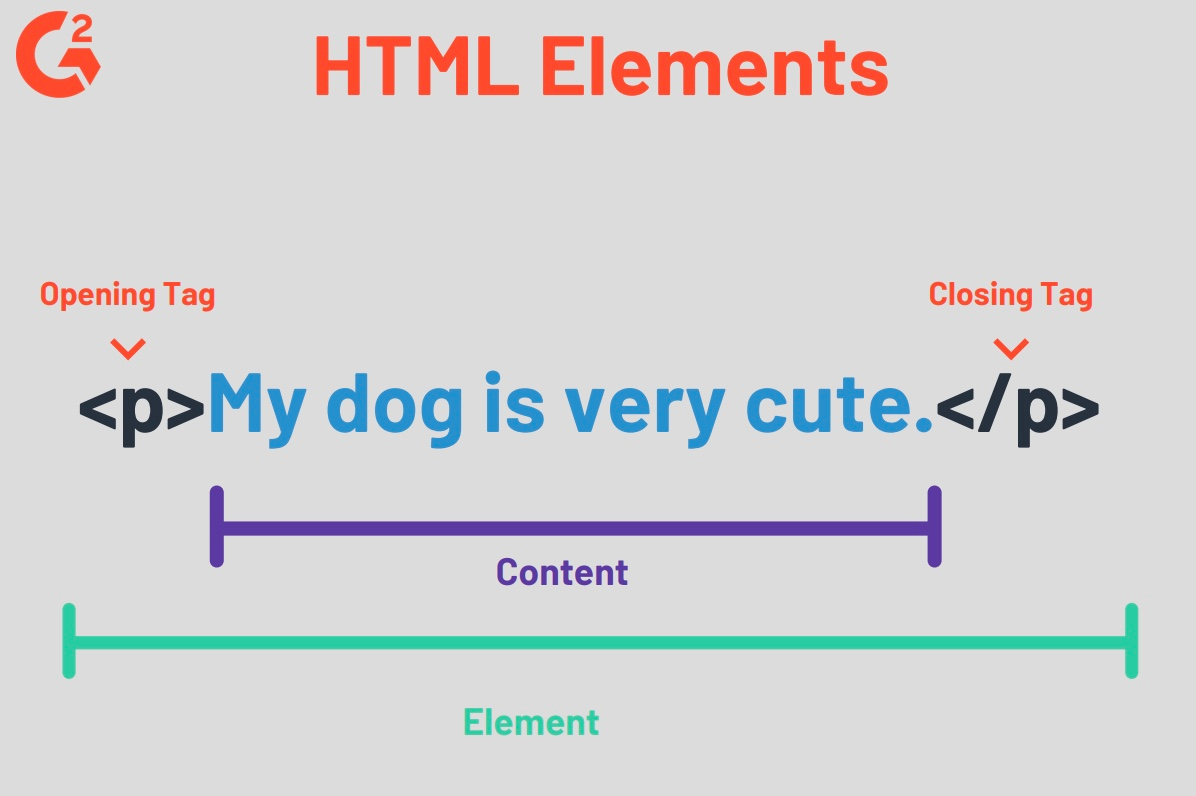
Self closing tags
(voorbeelden)
Tag
|
Betekenis
|
<br> of <br /> |
naar volgende regel |
<img> of <img /> |
plaatje invoegen |
<meta> of <meta /> |
informatie over pagina
|
<hr> of <hr /> |
horizontale lijn |
<input> of <input /> |
vraag gebruiker om input |
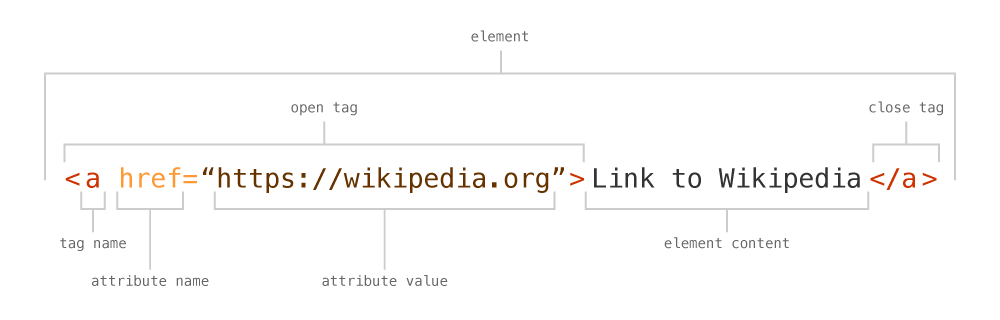
Link
Wat is leerplein?
Sotware developer wordt je door het te doen net als fietsen!
Tijdens het Leerpein kan je dus meters maken.
Je leert ook je eigen werk plannen, zelfstandig werken en zelfstandig problemen oplossen.
Alle 1ste klassen zullen 3 uur de tijd hebben om huiswerk en eventueel andere werkzaamheden te doen die te maken hebben met de AO vakken. Tijdens de Leerpleinuren werk je zelfstandig, help je elkaar en kun je als je er niet uit komt één van de docenten om hulp vragen.
De afspraken
- Leerplein is verplicht.
- Leerplein is in de eerste plaats om je huiswerk te maken voor je AO/Software Development vakken.
- Als je de leerpleinuren anders wilt besteden dan is daar ruimte voor maar dat moet wel in overleg met de docenten en het dient in je planning (volgend punt) te worden opgenomen.
- Tijdens de leerpleinuren maak je een planning in Excel, zie bijlage.
In de planning plan je werk voor de komende drie uur.
Aan het eind van de drie uur bepaal je in hoeverre je je planning hebt gehaald. Dat vul je weer in.
Je planning lever je na elk leerplein-les in via Teams 'Leerplein'. Je planning en werkhouding tijdens de les wordt beoordeeld! - Tijdens leerplein werk je zelfstandig; als je er niet uit komt dan ga je zelf op onderzoek uit, daarna vraag je je klasgenoot en pas in de laatste plaats vraag je hulp aan één van de docenten.
- Als je al het AO huiswerk af hebt dan mag je: ander huiswerk maken, aan andere IT projecten werken of de AO docenten hebben extra plus werk.
--
VSC en Git
Voor je examen moet je in staat zijn om een versie controle systeem te gebruiken. Met een versie controle systeem kun je makkelijk terug naar een oude versie van je code.
Ben je dus bezig met een nieuwe opdracht en je hele code werkt niet meer, dan ga je gewoon terug naar de vorige versie. Hoe dit werkt wordt heit uitgelegd.
Tip: framework -> gebruik Git!
Gebruik je React, Yii, Laravel of een ander framework dan is het aan te raden om Git te gebruiken.
Hiermee zorg je dat je telkens terug kan naar de vorige werkende versie.
Hoe installeer je Git en stel je alles goed in, in VSC?
Hieronder wordt dit in 4 stappen uitgelegd.
Stap 1 Git voor Windows
Je hebt Git voor Windows geinstalleerd? Nee, doe dat dan eerst. Tijdens de installatie worden veel dingen gevraagd, als je het neit weet dan kun je gewoon alle standaard opties aan laten staan.
Stap 2 configureer Git voor Windows
Ga naar een termninal in VCS en stel je naam en email in voor het gebruik van Git hub.
git config --global user.name "Issrae Marqui"
git config --global user.email "issramarqui@student.com"
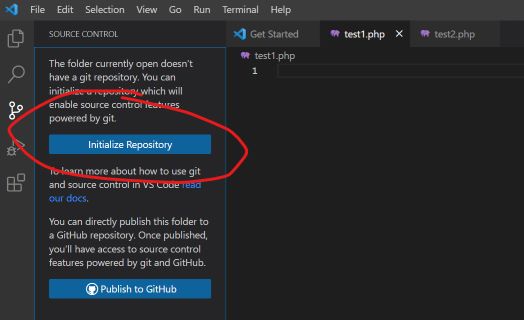
Stap 3 Initialize Repository
Open een project in VSC.
Klik op het derde icoontje aan de rechterkant (met die drie bolletjes) en druk dan op Initialize Repostitory.
Stap 4 Commit
Na de init moet je je project files "commiten". Je maakt als het ware een versie (waar je naar terug kan).
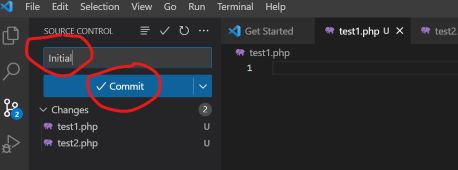
Je ziet in dit voorbeeld dat er twee bestanden zijn gewijzigd.
Vul een korte 'titel' bij Message in voor deze versie en druk op commit.
Je bent nu klaar.
Elke keer als je je code hebt aangepast en alles werkt, doe je een commit. Je kunt dan altijd terug.
Wijzigingen bekijken
Stel je hebt een bestand gewijzigd en je wilt zien wat er is gewijzigd.
Installeer hiervoor een plug-in:
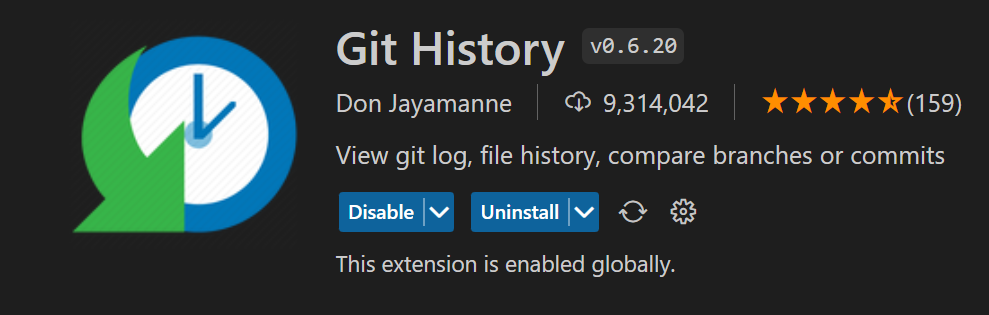
Druk op het versie beheer-icoontje (rechts, derde van boven). Kies dan het bestand waarvan je de wijzigingen wilt zien. Je ziet nu de vorige versie en de neiuwe versie (die nog niet is ge-commit) naast elkaar en de wijzigingen zijn aangegeven.
Met het ronde pijltje acter de bestandsnaam kan je alle wijzigingen in dit bestand in één keer terug draaien.
Versies vergelijken
Wil je oudere wijzigingen zien? Dat kan ook druk dan op het rondje boven de message met het klokje erin.
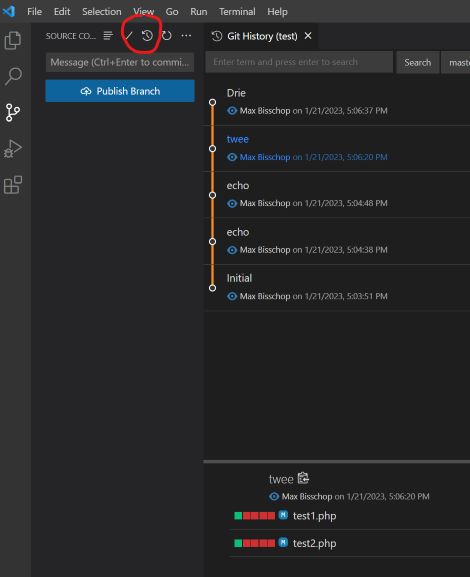
Je ziet dan rechts alle wijzigingen. Je kunt op ene versie klikken en dan kan je zien hoe die versie er uit zag.
Terug naar een versie
Stel je wilt de file index.php terug zetten.
git checkout versionid file_nameWil je alles terug zetten gebruik dan:
git checkout versioniden dan weer terug naar de laatste versie.
git checkout ---
Video ERD maken
In deze video wordt uitgelegd hoe je een ERD opstelt. De opdracht die wordt uitgelegd is:
Je kunt ook deze link gebruiken: https://youtu.be/_q_lvnJ9enw
De opgave die bij deze video hoort:
|
De planner van het schoolrooster wil een planning maken. In de planning moet komen te staan welke klas wanneer welk vak heeft. De volgende functionaliteiten moet het datamodel ondersteunen.
|
Quiz3
Front End Basic
Bespreek en beantwoord de volgende vragen. Je kunt google gebruiken. Probeer in één of twee zinnen een antwoord te formuleren.
- Waarvoor gebruikt je HTML?
- Waarvoor gebruik je CSS?
- Waarvoor gebruik je JavaScript?
- Wat is het verschil tussen JavaScript en Java?
- Wat is front-end?
- Wat is back-end?
- Geef van alle technieken weer of het op de front-end of back-end wordt gebruik
Techniek Front-End Back-End HTML Ja/Nee Ja/Nee CSS Ja/Nee Ja/Nee JavScript Ja/Nee Ja/Nee Java Ja/Nee Ja/Nee PHP Ja/Nee Ja/Nee C# Ja/Nee Ja/Nee SQL (Database) Ja/Nee Ja/Nee - Je wilt een zeer eenvoudige (‘quick and dirty’) website, welke techniek(en) gebruik je?
- Je wilt één web pagina met een zeer specifieke en mooie vormgeving, welke techniek(en) gebruik je?
- Je wilt een web site bouwen voor school waarbij ze het lesrooster kunnen bijhouden en waarbij studenten via internet hun rooster kunnen raadplegen. Welke techniek(en) gebruik je?
What is Programming?
Podcast
(created with NotebookLM)
What is Programming?
Programming is like giving instructions to a computer to make it do what you want. Imagine you have a robot helper, and you need to tell it step-by-step how to complete a task, like building a LEGO set or solving a puzzle. Programmers write these instructions using special languages that computers understand. By programming, you can create games, apps, websites, and much more!
Skills You Need to Become a Good Programmer
-
Focus and Concentration
- Why It’s Important: Writing code requires attention to detail. A small mistake, like a missing comma, can cause your program to not work.
- How to Improve: Practice coding regularly and try to minimize distractions when you work.
-
Precision and Accuracy
- Why It’s Important: Computers follow instructions exactly as you write them. Being precise ensures your program does what you intend.
- How to Improve: Double-check your code and test it frequently to catch and fix errors.
-
Patience and Tolerance
- Why It’s Important: Sometimes, your code won’t work right away. Bugs and errors are normal parts of programming.
- How to Improve: Stay calm when things go wrong and take breaks if you feel frustrated. Persistence pays off!
-
Teamwork
- Why It’s Important: Many programming projects are too big for one person. Working well with others helps you build better software.
- How to Improve: Communicate clearly with your team, share ideas, and be open to others’ suggestions.
-
Presentation Skills
- Why It’s Important: You need to explain your ideas and showcase your work to others, whether it’s classmates, teachers, or future employers.
- How to Improve: Practice explaining your projects and get comfortable with showing your work to others.
-
Planning and Organization
- Why It’s Important: Breaking down a big project into smaller, manageable tasks helps you stay on track and meet deadlines.
- How to Improve: Use tools like to-do lists or project management apps to organize your tasks and set goals.
Loving Puzzles and Being Curious
- Puzzle-Solving: If you enjoy solving puzzles, programming will feel like a fun challenge. Each problem you solve makes your program better and more efficient.
- Curiosity: Being curious drives you to learn new things, explore different ways to solve problems, and stay updated with the latest technology trends.
The Influence of AI on Programming Jobs
Artificial Intelligence (AI) is changing the way programmers work, but it’s not replacing them. Here’s how AI is influencing programming:
-
Automation of Repetitive Tasks
- What It Means: AI can handle routine coding tasks, like writing boilerplate code or testing, which saves time.
- Your Advantage: You can focus on more creative and complex parts of programming, making your work more interesting and impactful.
-
Enhanced Tools and Assistance
- What It Means: AI-powered tools can help you write better code by suggesting improvements, finding bugs, and optimizing performance.
- Your Advantage: These tools can make you more efficient and help you learn new programming techniques faster.
-
New Opportunities
- What It Means: As AI technology grows, there are more opportunities to work on innovative projects, such as developing smart applications, creating AI models, and improving machine learning systems.
- Your Advantage: Learning about AI and how to integrate it into your projects can open up exciting career paths.
-
Continuous Learning
- What It Means: The field of AI is always evolving, so programmers need to keep learning new skills and staying updated with the latest advancements.
- Your Advantage: Embracing lifelong learning will keep you adaptable and valuable in the tech industry.
In Summary
Programming is a creative and exciting field where you get to build things with code. To become a good programmer, you need to be focused, precise, patient, and able to work well with others. Loving to solve puzzles and being curious will help you enjoy and excel in programming. Additionally, understanding and leveraging AI can enhance your skills and open up new opportunities in your programming career. With dedication and the right mindset, you can become a successful and innovative programmer!
Programming Essentials: A Study Guide
Short Answer Questions
Answer the following questions in 2-3 sentences.
- Why are focus and concentration vital skills for a programmer?
- How does the principle of precision in programming differ from its application in other fields?
- Explain how patience and tolerance contribute to a programmer's success.
- What are the benefits of effective teamwork in a programming context?
- Why are presentation skills important for programmers, even if they possess exceptional technical skills?
- How can a programmer benefit from incorporating planning and organization into their workflow?
- What makes puzzle-solving an advantageous trait for aspiring programmers?
- Why is curiosity considered a valuable asset in the field of programming?
- How is Artificial Intelligence (AI) automating repetitive tasks within the programming domain?
- Describe how AI is creating "New Opportunities" for programmers.
Short Answer Key
- Focus and concentration are crucial for programmers because even small errors in code, like a missing comma, can prevent a program from functioning correctly. This meticulousness ensures accurate implementation of instructions.
- Precision in programming demands absolute accuracy as computers interpret instructions literally. Unlike in other fields where approximations might suffice, programming requires exact syntax and logic for the desired outcome.
- Patience and tolerance are essential for programmers as debugging and resolving errors are integral parts of the process. Remaining calm and persistent when facing challenges allows for effective problem-solving.
- Teamwork in programming allows for diverse perspectives and skillsets to converge, resulting in more robust and innovative software solutions. Collaboration facilitates efficient division of labour and effective troubleshooting.
- Presentation skills are vital for programmers as they need to effectively communicate their ideas, solutions, and the value of their work to both technical and non-technical audiences. This includes clearly articulating complex concepts and design choices.
- Planning and organization help programmers break down complex projects into smaller, manageable tasks. This systematic approach ensures projects stay on track, deadlines are met, and code remains well-structured and maintainable.
- Puzzle-solving aligns with programming as it involves breaking down problems into smaller components, analyzing patterns, and applying logical reasoning to find solutions – all essential skills for effective coding.
- Curiosity encourages programmers to explore new technologies, delve into unfamiliar programming concepts, and continuously seek innovative solutions. This constant learning and adaptation are crucial in the ever-evolving tech landscape.
- AI is automating repetitive programming tasks such as generating boilerplate code, conducting basic testing, and identifying potential code vulnerabilities. This automation frees up programmers to focus on more complex and creative aspects of development.
- AI is creating new opportunities for programmers by driving demand for professionals skilled in AI development, machine learning integration, and intelligent application design. This expansion of the field offers programmers exciting and specialized career paths.
Essay Questions
- Discuss the importance of lifelong learning in the context of a programming career, emphasizing how evolving technologies and industry trends impact a programmer's relevance and success.
- Analyze the evolving relationship between artificial intelligence and programming. Explore both the concerns and opportunities AI presents for aspiring programmers.
- Explain how the combination of hard skills, such as proficiency in specific programming languages, and soft skills, such as communication and problem-solving, contributes to a well-rounded programming professional.
- Evaluate the significance of both individual focus and collaborative teamwork in programming projects. When are each of these approaches most effective, and how can a balance between them be achieved?
- Choose one programming language and discuss its key features, advantages, and limitations. Provide specific examples of the types of applications for which this language is well-suited.
Opgaven 5 jan 2026
...
<body>

    <form action="verwerk.php" method="GET">
        <label for="id1">Veld 1:</label>
        <input type="text" id="id1" name="naam1"><br><br>
        <label for="id2">Veld 2:</label>
        <input type="text" id="id2" name="naam2"><br><br>
        <label for="id3">Veld 3:</label>
        <input type="text" id="id3" name="naam3"><br><br>
        <input type="submit" value="Verzenden">
    </form>

</body>
...